Widget not showing on your website
Find out why a widget doesn't appear on your site, from an unpublished draft to a blocked script, and fix each cause.
If a widget doesn't appear on your website, work through these checks in order. The browser console, near the end, can tell you which one applies. If the widget shows but its font, colours or layout don't match the builder, see Widget looks different on your website. If it shows but its views stay at zero, see When a view isn't counted.
Make sure it's published
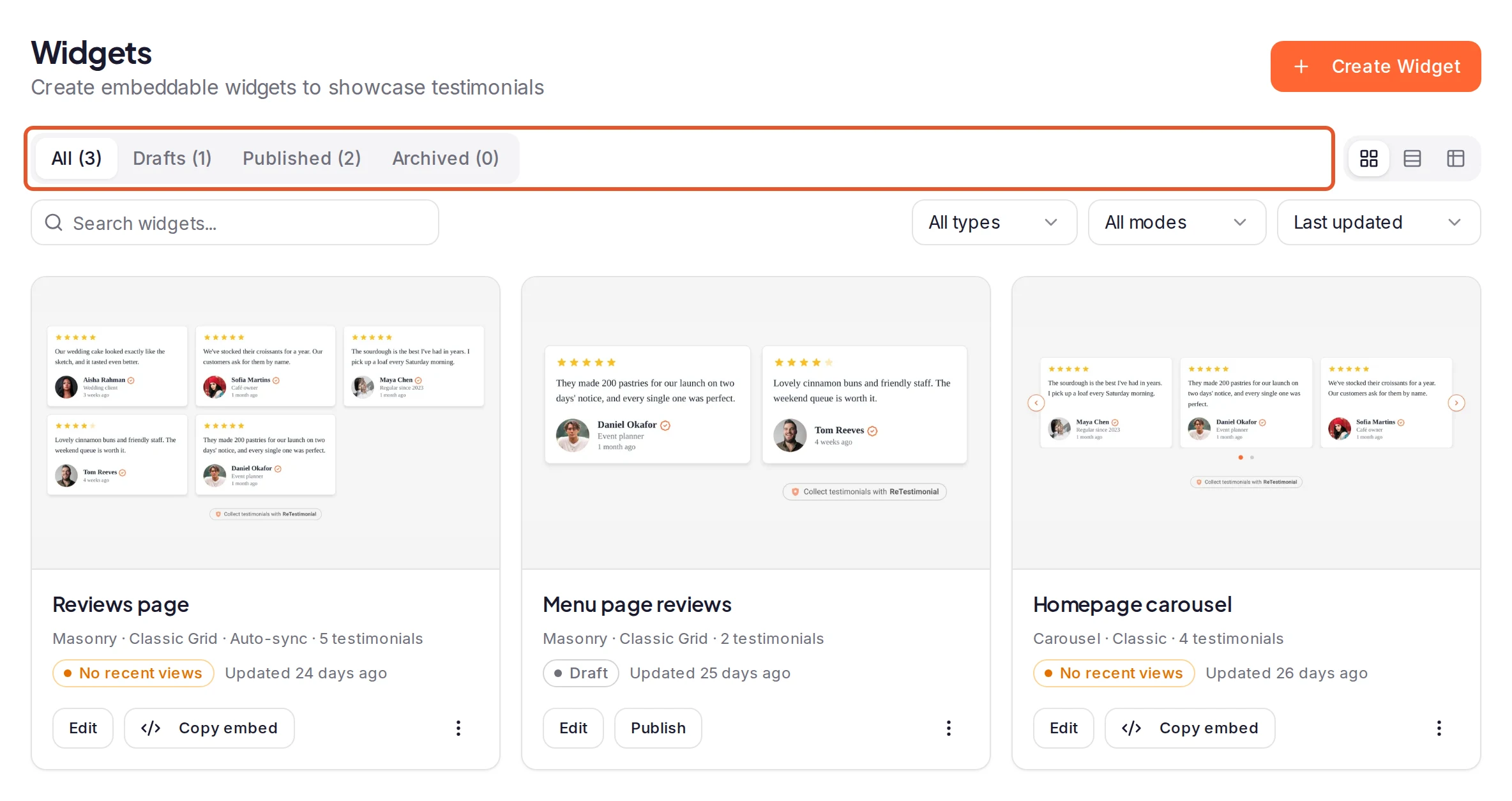
Your site shows a widget only while it's published. On the Widgets page, under Share in your project's sidebar, check which tab lists it:
- Drafts: click Publish in the builder's top bar, or choose Publish from the widget's menu. The code on your site stays the same. If it won't publish, see If you can't publish.
- Archived: choose Restore from the widget's menu. It comes back as a draft, so publish it again.
A deleted widget's code stops working for good. Create a new widget and replace the old code with its code.
Make sure it has testimonials to show
A widget shows only approved testimonials, and archiving one takes it out of every widget. See Approve, reject and archive testimonials.
- Curate: keep at least one approved testimonial in the widget.
- Auto-sync and Proof Match: check that the rules match at least one approved testimonial. The preview in the builder shows what they pick. For a Proof Match rule that never applies, see Set up Proof Match rules.
- Video widgets show only video testimonials.
With nothing to show, many styles display a message such as No testimonials to display, and a Floating Proof widget shows nothing.
Check the code on your page
- Paste all of it, unchanged. The
<script>loads the widget into the<div>that has the classretestimonial-widgetand adata-widget-key. If either one is missing or edited, nothing appears. - Check the live page. Some site builders strip scripts when you save, or show a placeholder in their editor. See Embed a widget on WordPress and Embed a widget on Webflow.
- Switched to a floating style? If the widget was already on your site when you switched it to Floating Proof, the Floating Proof Tab or the Video type's Floating CTA style, click Get code and replace the old code. The old code waits for a visitor to scroll to where it sits.
If some visitors don't see it
- Floating Proof widgets follow Pages & Dismissal on the Layout tab. Show on pages and Hide on pages decide where they appear. A visitor who closes one doesn't see it again in that browser for as long as After a visitor dismisses it says, so test in a private window. A Proof Toast also waits for First toast after.
- Proof Impact experiments hide the widget, by design, from visitors in an experiment's no-proof group. Experiments are available on Business.
- A widget lower on the page loads as a visitor scrolls close to it.
Check your subscription
Widgets stop showing when billing lapses and its protection period ends. The Billing page shows which case applies:
- A payment failed. Payment recovery required gives the date your widgets and walls stay protected until, 30 days after the failed payment. After it, they're hidden until the payment goes through. Click Update payment method. See Payment failed.
- The project is read-only. When your plan covers fewer projects, for example after you cancel and return to Free, the projects you don't keep active become read-only. Their widgets stay live for up to 30 days, then stop until the project is active again. See Project is read-only.
Allow it in your security policy
If your site sends a Content Security Policy, it has to allow the widget. Add https://cdn.retestimonial.com, the address in your code's <script>, to script-src and connect-src, and https://retestimonial.com to connect-src. If you use Iframe / Embed URL, also add https://widgets.retestimonial.com, the frame's address, to frame-src. Photos, fonts and videos can come from other addresses; the browser console names each one the policy blocks.
If you used the iframe code
If you chose Iframe / Embed URL under Get code, whether you pasted the iframe code (it starts with <iframe) or only the Embed URL from Copy URL:
- This widget is unavailable with "Check that the embed URL is correct and the widget is published…" has several possible causes. Check them in this order:
- the widget isn't published, or its code was changed: see Make sure it's published;
- the widget now uses a style the iframe can't show, such as a floating one: use the Script code instead;
- billing stopped it;
- a temporary problem: reload the page.
- This widget is unavailable with "Testimonials could not be loaded. Please reload this embed." is a temporary problem: reload the page.
- The frame keeps the height you set in Height (px) under Get code. If the widget is cut off, raise it and copy the code again, or tick Automatic sizing and Proof Impact and copy the new code. If you pasted only the URL, set the height in your platform's embed block instead.
- Some styles, including every floating one, work only with the Script code. See Script or iframe for what else a frame can't do.
If changes don't show yet
Your site can take a few minutes to pick up changes to a published widget, or to stop showing one you unpublish. Reload the page after a few minutes. See How soon your site shows a change.
Find the cause in the browser console
Open the page, right-click it, choose Inspect and open the Console tab. Reload the page, then type retestimonial in the console's filter box.
| Message | What it means |
|---|---|
ReTestimonial: Failed to load widget with Failed to fetch widget payload (404) | The widget isn't live: it's a draft, archived or deleted, its code was edited, or billing stopped it. |
ReTestimonial: Failed to load widget with a network error | Something blocked the widget's data, such as your security policy. |
ReTestimonial Widget Loader Error: | The widget's script didn't load. Check your security policy. |
| A Content Security Policy message naming a retestimonial.com address | Your security policy blocks that address. |
| Nothing, and no widget | The code didn't run: check the code on your page. A Floating Proof widget hidden by Pages & Dismissal logs nothing either. |
Still not showing?
Contact us and include:
- the address of the page where you added the widget;
- the widget's name;
- a screenshot of the browser console after you reload the page.
Next steps
Was this page helpful?