Form submissions not arriving in your inbox
Find a testimonial someone sent through your form, or find out why it was blocked, from a hidden inbox view to spam checks, limits and a paused form.
When someone submits one of your forms, the testimonial is saved to the form's project and appears in its inbox straight away. If you can't find one, start with the first check below. If the customer saw a message on the form, go to The form blocked the submission.
Check this first
Most missing submissions are in the inbox, just not where you're looking.
- Open Forms under Collect in your project's sidebar. Each form's card shows how many submissions it has saved. Click that number, or choose View submissions in the form's More options menu, to open the inbox filtered to that form: Pending, or Approved when the form approves new testimonials itself. If the number went up when the customer submitted, the testimonial reached ReTestimonial.
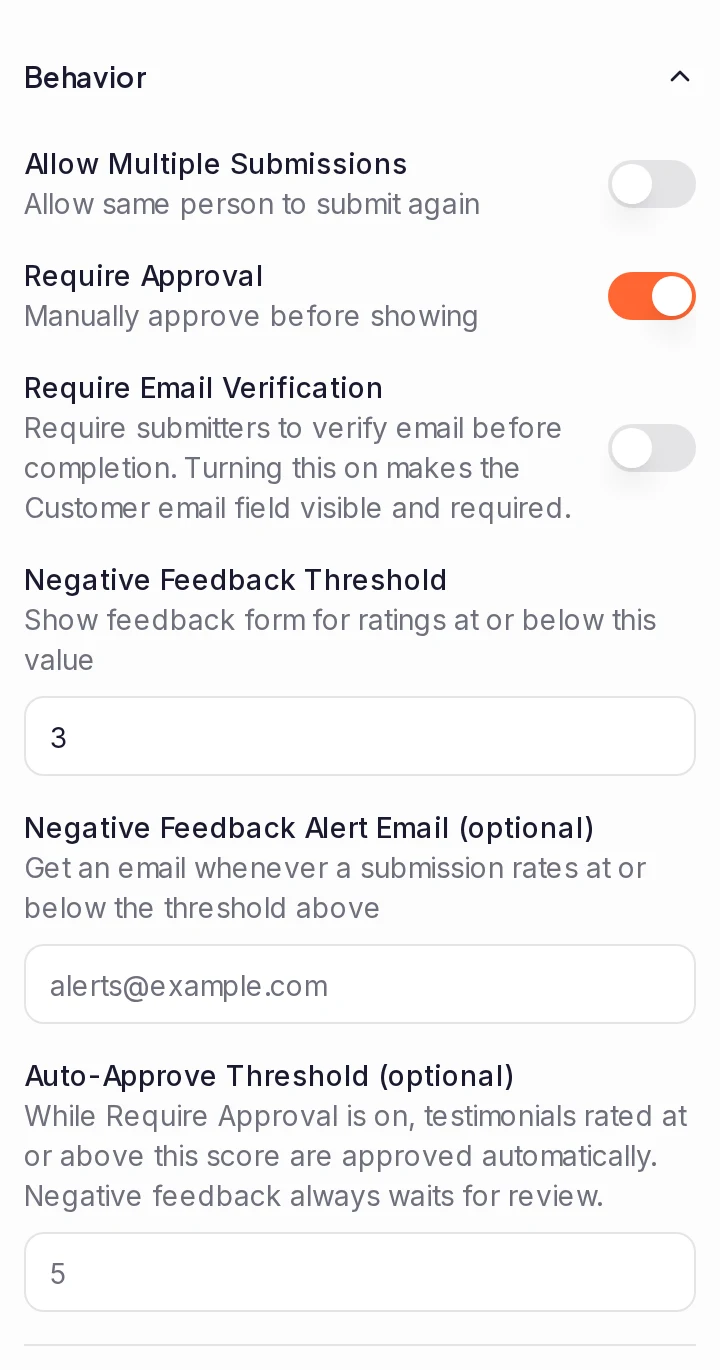
- Look in Approved. Pending lists only testimonials that wait for approval, and a form approves new testimonials itself when Require Approval is off on its Settings tab, under Behavior. With it on, a rating at or above the Auto-Approve Threshold is approved straight away too.
- Look in Archived. A teammate may have rejected or archived it.
- Clear your filters. Filter chips below the toolbar, a search, or a saved view picked in the view menu can hide it: choose All pending (or All approved) in the view menu and remove the chips. To find one person, type their name or email in the search box. See Filter and search your inbox.
- Check the project. Each project has its own forms and inbox, and a form's link contains its project's slug. To switch projects, use the project menu at the bottom of the sidebar.
The form blocked the submission
When the form refuses a submission, nothing is saved, and the customer sees one of these messages on the form:
| Message | Why | What to do |
|---|---|---|
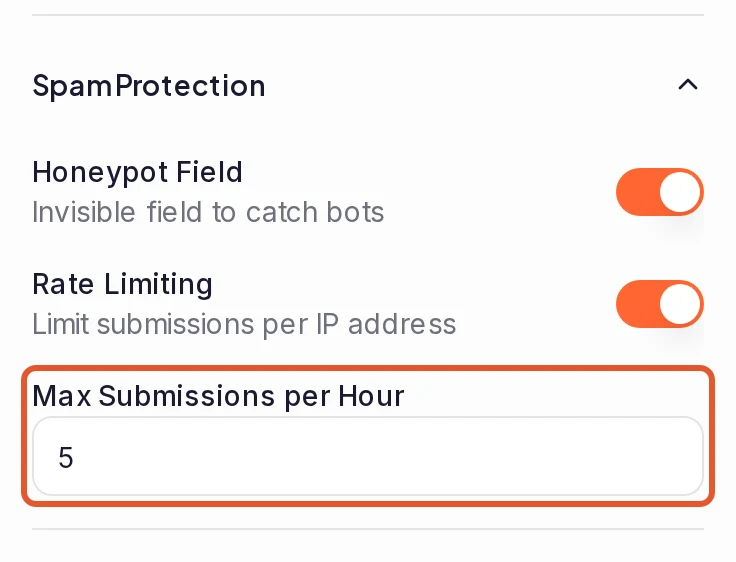
| Rate limit exceeded. Please try again later. | The form's own Rate Limiting, on for a new form, allows a set number of submissions per hour from one IP address. People on one network, such as at an event or in one office, share an address. You can also reach the limit yourself while testing the form. | On the form's Settings tab, under Spam Protection, raise Max Submissions per Hour or switch off Rate Limiting. |
| You have already submitted a testimonial with this email. | Allow Multiple Submissions is off, as it is for a new form, and this address has already submitted this form. A submission waiting in Spam doesn't count. | Switch on Allow Multiple Submissions on the form's Settings tab, under Behavior. |
| Verify your email before submitting this form. | Require Email Verification is on and the customer hasn't opened the link we emailed them. | See Verification links don't arrive. |
| Form not found | The form was paused, or its address changed, while the customer had it open. | See Customers can't open the form, then send them the current link. |
| This form can't accept new testimonials right now. Please let the business know. | Your workspace has reached its plan's limit of written, audio and linked media testimonials (imported video and podcast links count too): 10 across all your projects on Free. You also get a notification, at most once a day. | Upgrade to Pro or higher, or make room: archived, rejected and spam testimonials don't count, so archiving or deleting ones you don't show frees space. See Plan limits. |
| This form can't accept new videos right now. Please let the business know. | Your plan's limit of video testimonials is reached. Some plans count videos per project and others across the whole workspace; the notification you get, at most once a day, says which. | Upgrade, or make room by archiving videos you don't show. When the limit is per project, only this project's videos count. See Plan limits. |
| This video is longer than this form accepts (up to N minutes). Please record a shorter one. | The video is longer than your plan allows. The message gives your plan's maximum in place of N; Video still processing lists it for each plan. | Ask the customer for a shorter video, or upgrade for longer ones. |
A submission your spam check scores at or above your Spam Threshold isn't refused: the customer sees the usual thank-you, and it waits in Spam instead of Pending. Nobody is notified, no email or webhook goes out, and no reward is given. If a customer says they submitted but you can't find the testimonial, look in Spam and click Not Spam on it: it then arrives like any other submission, with its notification, emails and webhooks. The spam score adds up signals such as spam-like wording, links, a copy of a testimonial already in the project, and many submissions from one IP address within the hour. That last one is the Rate Limit (per hour) in Spam Settings, separate from the form's own Rate Limiting. If real customers keep landing in Spam, add their addresses to Whitelist, raise Spam Threshold or Rate Limit (per hour), or turn off Duplicate Detection or URL Detection: see Keep spam out of your inbox.
Customers can't open the form
If the form's link shows a page-not-found error, nothing can be submitted:
- The form is paused. Open it in the form builder. If the badge beside its name says Paused or Paused (draft), click it and choose Activate form.
- The project's slug changed after you shared the link. Links contain the project's slug. Changing Project Slug in the project's General settings breaks the links, QR codes and embeds you've already shared: the old address doesn't forward. Share the new link from Share in the builder's top bar. Changing a form's own URL slug on its Settings tab is different: the old address forwards to the form, as long as the form is active and you haven't given that slug to another form. See Share or embed your form.
- Billing closed the form. See Check your subscription.
Customers get stuck before the end
A form won't move on while a required answer is missing. It stays on the page and shows a message under the answer, such as "Please share your answer". To see what customers see, click through the builder's preview and leave a required answer empty. See Add questions, ratings and required answers.
To see where people give up, click Analytics on the form's card. Many more Starts than Completions means customers are leaving part way, and Per-Page Drop-off shows the page where they stop.
A video didn't come through
- The customer couldn't record or upload it. If they saw a message about the camera, the browser, or the video's length or size, see Customers can't record a video.
- Your plan's video limit is reached. On Free, your workspace can hold 2 video testimonials across all its projects; on Pro, each project can hold 10. Archived, rejected and spam videos don't count. Once the limit is reached, the customer gets the message "This form can't accept new videos right now. Please let the business know." when they try to upload their video, and it isn't sent. You also get a notification, at most once a day. Upgrade, or archive video testimonials you don't need.
- The video is still processing. The testimonial arrives straight away, but its card shows no video until processing finishes. See Video testimonial still processing.
Check your subscription
Forms stop taking submissions when billing lapses:
- A payment failed. If it isn't fixed in time, the workspace becomes read-only and its forms close until the payment goes through: their links show a page-not-found error. Click Update payment method on Billing. See Payment failed.
- The project is read-only. When your plan covers fewer projects, for example after you cancel and return to Free, the projects you don't keep active become read-only, and their forms close at once. Their links show a page-not-found error, and a customer who was already on a form sees "This form is unavailable because the project is read-only." See Project is read-only.
You didn't get an email about it
The new testimonial email is separate from the inbox: a testimonial can arrive without the email reaching you. See New testimonial emails don't arrive.
Still missing?
Contact us and include:
- the link to the form the customer used;
- the customer's name or email address, and roughly when they submitted;
- what they saw after submitting: a thank-you screen, or a message, word for word.
Next steps
Was this page helpful?
Can't approve, edit or delete a testimonial
Find out why an inbox action says Failed to update testimonial, or why its button is missing, and fix it, from your role to a read-only project.
Customers can't record a video
What your customer saw when your form wouldn't record their video, what each message means, and what to tell them to do next.