Import App Store reviews
Connect your app's App Store listing one country at a time, import its reviews as testimonials and keep new ones coming in with auto-sync.
Bring the reviews your app already has on the Apple App Store into ReTestimonial. Each written review becomes a testimonial you can approve and show like any other. App Store review import is available on Business.
Before you start
App Store reviews belong to one country's store, which Apple calls a storefront. Each connection is one app in one storefront. To import reviews from several countries, connect the same app once for each country; every connection uses one of your plan's connection slots.
To find your app, you need its name, its App Store link or its numeric Apple ID. You don't sign in to Apple.
Open the App Store tab
In your project, open Review Platforms under Collect in the sidebar, then click the App Store tab.
Find your app
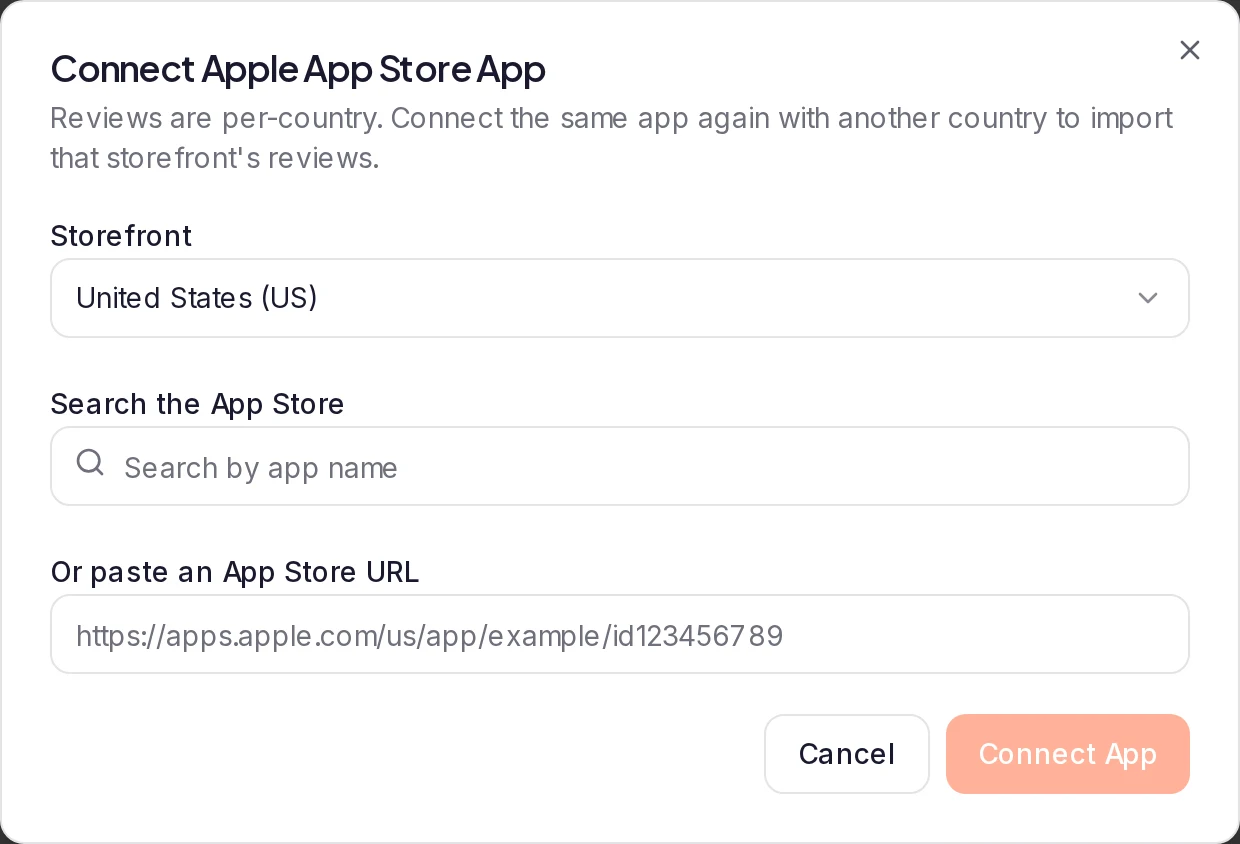
Click Connect App. Under Storefront, pick the country whose reviews you want. Then either:
- type your app's name into Search the App Store and click it in the results, which come from the storefront you picked; or
- paste your app's link into Or paste an App Store URL. To get the link, open your app's page on the App Store website and copy the address. If the link names a country, Storefront switches to it.
The URL field also takes the app's numeric ID on its own. That's the Apple ID listed under App Information in App Store Connect, and the number after id in your App Store link (Apple's App information reference).
Connect it
If you picked a search result, check the line that names your app and country, then click Connect App. The app appears as a card under Connected App Storefronts, with its overall star rating and its number of ratings.
Import reviews
On the app's card, click Import. In the Import App Store Reviews dialog, use the Reviews to import slider to choose how many reviews to bring in. The slider stops at your plan's per-import limit, or at what's left of this month's allowance if that's lower. Tick Auto-approve imported reviews if you want to skip the Pending step.
Click the button at the bottom of the dialog; its label shows how many reviews you chose. Reviews come in newest first.
Where imported reviews go
Imported reviews arrive in Pending, where you approve the ones you want to show. If you ticked Auto-approve imported reviews, they go straight to Approved. You can also find them under All Imports in the sidebar.
Each review comes in as a text testimonial with the reviewer's name (or "Anonymous" when there's none), the star rating, the review's title and text, the review date and a link back to the App Store. Reviews come in without a reviewer photo.
The app's overall rating and number of ratings stay on its card, and they're refreshed each time you import or sync. They aren't imported as a testimonial.
Which reviews are imported
- Reviews with written text are imported. A review without text is skipped.
- Reviews at every star rating are imported; there's no minimum-rating filter. To keep lower-rated reviews off your site, leave auto-approve off and approve only the ones you want.
- A review is never imported twice.
If older reviews don't come in
Reviews come in newest first, so the oldest come last. Two things can stop an import before it reaches them:
- Apple's own limit. Apple makes only about the 500 most recent reviews per country available, so reviews older than those can't be imported.
- Your plan's limits. One import brings in up to your plan's per-import limit. Run Import again to continue with older reviews you haven't imported yet, until this month's allowance is used up. See Plan limits.
Import new reviews automatically (auto-sync)
Click Sync on an app's card to check for new reviews right away. Each sync imports up to 50 reviews you haven't imported yet, newest first. The button shows how many syncs you've used this month.
To import new reviews on a schedule, open the menu on the app's card and choose Settings. In App Store Sync Settings, turn on Auto-sync reviews and click Save Settings. The Auto-sync frequency is Monthly. Auto-sync runs once that interval has passed since the app was last imported or synced, so an Import or Sync you run yourself moves the next automatic one back. Each run imports up to 50 new reviews. For what each setting does, see Keep imported reviews up to date with auto-sync.
In the same dialog:
- Auto-approve synced reviews sends reviews from Sync and auto-sync straight to Approved instead of Pending.
- Notify on new reviews tells you when an import, a sync or auto-sync brings in new reviews: Email notifications emails the workspace owner, and In-app notifications adds a notification in ReTestimonial.
If an automatic sync fails after its retries, or is skipped because the month's reviews are used up, the people who manage the project get a notification: App Store reviews couldn't be imported after a failure, or App Store reviews not imported: monthly limit reached when the month's reviews are used up. In notification settings, this kind of notification is called Review sync needs attention.
Disconnect an app
Open the menu on the app's card, choose Disconnect and confirm with Disconnect. The connection is removed, and the reviews you imported stay in your project, along with this month's usage. If you connect the same app and storefront again later, reviews you've already imported aren't imported again.
Plan limits
On Business, each project can have:
- 5 storefront connections (the same app in two countries uses two);
- 100 reviews per import;
- 1,000 imported reviews per month, across all its App Store connections;
- 4 uses of Sync per month, across all its App Store connections.
Apple's own limit applies whatever your plan: only about the 500 most recent reviews per country can be imported. See If older reviews don't come in.
The Monthly usage bar on the App Store tab shows how many reviews you've imported this month. Once you reach the monthly limit, Import, Sync and auto-sync bring in nothing more until the next month begins. On other plans, the App Store tab shows an upgrade card instead; see Plans and pricing.
Each review counts once. Deleting imported reviews doesn't give back your monthly allowance, and a review you've already imported can't be imported again, even after you delete it or reconnect its app.
Only teammates with import access can connect apps, run imports and change sync settings. Everyone else sees this page read-only.
Messages you might see
- That app was not found in the selected App Store storefront. The app isn't sold in that country. Pick a storefront where it's available.
- We don't support the … App Store storefront yet. Your link is from a country that isn't in the Storefront list. Pick a listed storefront where your app is sold, then click Connect App.
- Search is temporarily unavailable — paste an App Store URL instead. Paste your app's link or Apple ID into Or paste an App Store URL.
- No new reviews found. Every review within reach has already been imported, or the new ones have no text.
Next steps
Was this page helpful?
Import Product Hunt reviews
Connect your product's Product Hunt page, import its reviews as testimonials and keep new ones coming in with auto-sync.
Import Booking.com reviews
Connect your Booking.com property, import its guest reviews as testimonials and bring in new reviews automatically with auto-sync.