Know when a testimonial arrives. Thank the customer who sent it.
Each new testimonial lands in your team's inbox with the stars, the words and one button to approve it. Your customer gets a thank-you in your name, and a note when their testimonial goes live. You choose who hears about it, and you write the words.
Included on every plan, including Free. No credit card.
Your team's inbox
[Testimonials] Ana Lima sent a testimonial

ReTestimonial <notifications@mail.retestimonial.com>
The new testimonial alert. Subject: [Testimonials] Ana Lima sent a testimonial.
ReTestimonial Waiting for your approval Ana Lima sent a testimonial Sent through Customer stories. Rating: 5 of 5 We used to chase clients for sign-off over email. Now they approve work in the Driftlane portal, and our projects close a week sooner. — Ana Lima · Operations Lead, Hourglass Email: ana@hourglass.example Company size: 51–200 Country: Lisbon, Portugal Hours saved a week: 6 Happy to be a reference: Yes Received: Oct 14, 2026, 09:41 AM UTC Review and approve: https://retestimonial.com/projects/driftlane/inbox Reply to this email to write to Ana directly. You're getting this because you're on the alert list for Driftlane. Change it in Project Settings → Notifications: https://retestimonial.com/projects/driftlane/settings/notifications ReTestimonial: https://retestimonial.com Help center: https://retestimonial.com/help
Ana Lima's inbox
Thanks for your testimonial

Driftlane via ReTestimonial <testimonials@mail.retestimonial.com>
The thank-you email. Subject: Thanks for your testimonial.
Driftlane Thanks, Ana We've received your testimonial for Driftlane and will review it shortly. Your testimonial: We used to chase clients for sign-off over email. Now they approve work in the Driftlane portal, and our projects close a week sooner. Your answers: Company size: 51–200 Country: Lisbon, Portugal Hours saved a week: 6 Happy to be a reference: Yes You're getting this because you submitted a testimonial to Driftlane. Powered by ReTestimonial: https://retestimonial.com
Four emails, each sent at the moment it matters.
A testimonial is sent, then approved, then maybe featured. Each step can send an email, and you switch each one on or off. Switch to Dark to see one as a mail app in dark mode shows it.
When the form is sent
When you approve it
When you feature it
- Sent when
- A form brings in a testimonial.
- In a new project
- On
The stars, the testimonial, every answer and a button to review and approve it. Reply, and you're writing to the customer.
[Testimonials] Ana Lima sent a testimonial
ReTestimonial <notifications@mail.retestimonial.com>
New testimonial alert, waiting for approval. Subject: [Testimonials] Ana Lima sent a testimonial.
ReTestimonial Waiting for your approval Ana Lima sent a testimonial Sent through Customer stories. Rating: 5 of 5 We used to chase clients for sign-off over email. Now they approve work in the Driftlane portal, and our projects close a week sooner. — Ana Lima · Operations Lead, Hourglass Email: ana@hourglass.example Company size: 51–200 Country: Lisbon, Portugal Hours saved a week: 6 Happy to be a reference: Yes Received: Oct 14, 2026, 09:41 AM UTC Review and approve: https://retestimonial.com/projects/driftlane/inbox Reply to this email to write to Ana directly. You're getting this because you're on the alert list for Driftlane. Change it in Project Settings → Notifications: https://retestimonial.com/projects/driftlane/settings/notifications ReTestimonial: https://retestimonial.com Help center: https://retestimonial.com/help
Write them the way you'd say it.
Each email to your customers has a subject and a short message for your own words. The email adds the rest: their testimonial, their answers and the button. The preview beside the editor is the email that goes out.
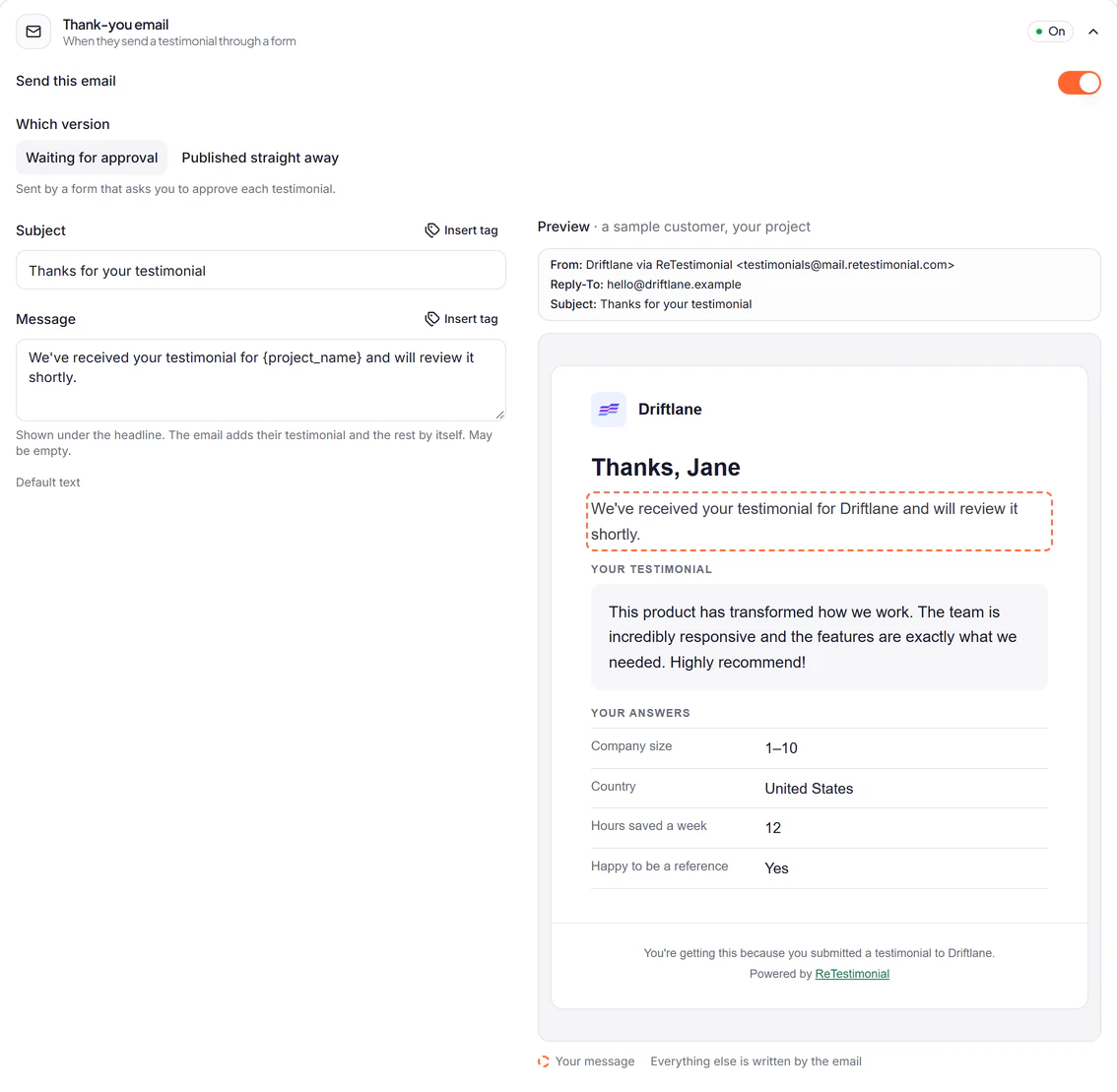
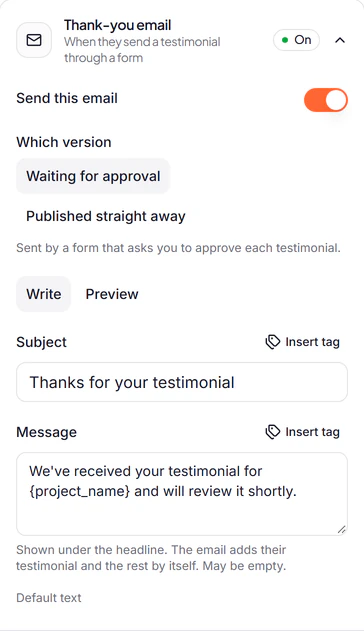
- A short message
- Up to 600 characters under the headline. Leave it empty and the email goes straight to their testimonial.
- Two thank-yous
- One for a form that waits for your approval, one for a form that publishes straight away. Write each.
- Back to ours any time
- Reset to default puts our text back. A text you never changed follows ours when we improve it.
- Your name at the top
- Your project's logo and name head the email, and it arrives from “Driftlane via ReTestimonial”.
- Replies come to you
- Choose the address your customers' replies reach. Leave it empty and they reach the workspace owner.
- Our line, or none
- Emails to your customers end with a small “Powered by ReTestimonial”. Switch it off on Business.
Tell the right people, and only them.
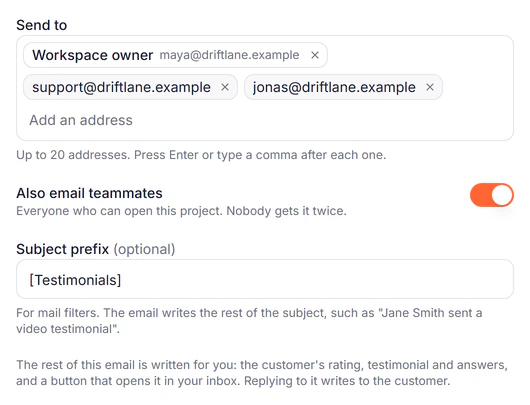
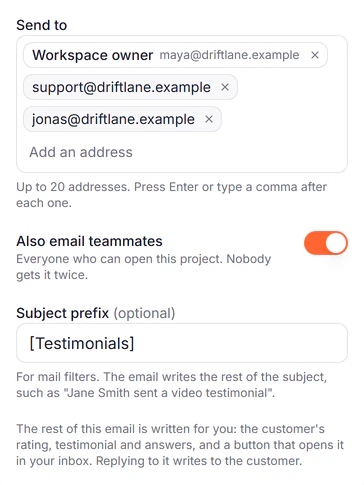
The alert goes to the workspace owner, always at their current address, and to anyone else you add. Its subject names who sent the testimonial, so a filter can sort it, and it opens on the stars and the words, so you know what arrived before you open anything.
- Up to 20 more addresses
- Type or paste them in. Your support inbox, a founder, an agency's client: anyone who should know.
- Your teammates, in one switch
- Send it to everyone who can open the project. Nobody gets it twice. Premium+
- A prefix for your filters
- Up to 40 characters before the subject, such as “[Testimonials]”.
- Reply to the customer
- Replying writes to the customer who sent the testimonial, when they left an address.
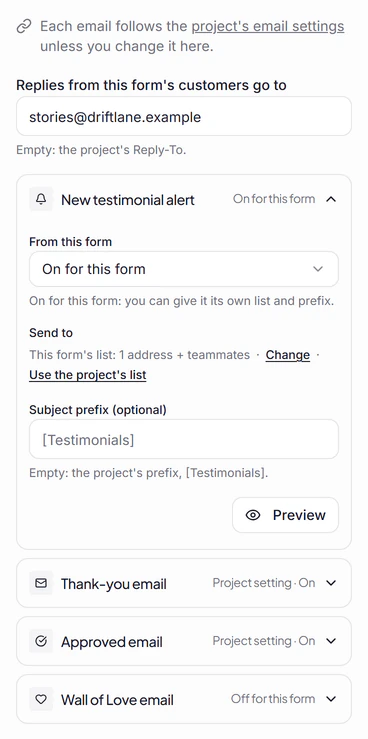
One form can have emails of its own.
Set the emails once for the project. Then give any form its own: each email follows the project, is on for that form, or is off for it. A form can have its own words, its own alert list and its own reply address.
- A form for one clientIts alert goes to the account manager, not the whole team.
- A form you hand out at eventsIt sends no thank-you: you thanked them at the stand.
- A form for video testimonialsIts thank-you says thanks for the video, in words of its own.
Know what happened to every email.
The Email Log lists each email your project sent in the last 30 days, who it went to and what happened to it, in plain words. Search by address, or show only the problems.
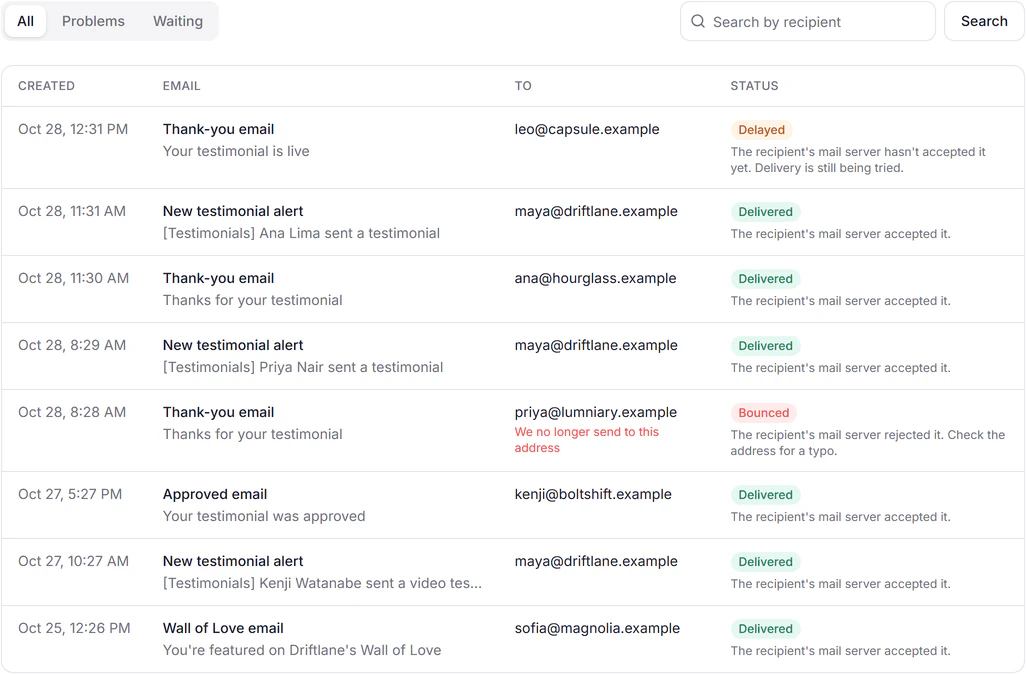
- DeliveredThe recipient's mail server accepted it.
- DelayedThe recipient's mail server hasn't accepted it yet.
- BouncedThe recipient's mail server rejected it.
- Reported as spamThe recipient marked it as spam, so we no longer send to this address.
- BlockedWe don't send to this address: an earlier email to it bounced or was reported as spam.
Safe to send in your name.
Anyone can type anyone's address into a form. So a thank-you to an address nobody confirmed carries your words and nothing the visitor typed: no testimonial, no name, no answers, no link. Nobody can use your form to send a stranger a message from you.
Address confirmed
Thanks for your testimonial
Driftlane via ReTestimonial <testimonials@mail.retestimonial.com>
The thank-you email to a confirmed address. Subject: Thanks for your testimonial.
Driftlane Thanks, Ana We've received your testimonial for Driftlane and will review it shortly. Your testimonial: We used to chase clients for sign-off over email. Now they approve work in the Driftlane portal, and our projects close a week sooner. Your answers: Company size: 51–200 Country: Lisbon, Portugal Hours saved a week: 6 Happy to be a reference: Yes You're getting this because you submitted a testimonial to Driftlane. Powered by ReTestimonial: https://retestimonial.com
Address nobody confirmed
Thanks for your testimonial
Driftlane via ReTestimonial <testimonials@mail.retestimonial.com>
The thank-you email to an address nobody confirmed. Subject: Thanks for your testimonial.
Driftlane Thank you We've received your testimonial for Driftlane and will review it shortly. You're getting this because you submitted a testimonial to Driftlane. Powered by ReTestimonial: https://retestimonial.com
- Confirmation, one switch away
- Ask for it on any form, and customers confirm their address from an email before they can send.
- Bounces stop the next email
- An address that bounced or marked an email as spam isn't emailed again, so one typo doesn't keep costing you.
- Limits that wait, not drop
- A project has an hourly limit and an address a daily one. Past them, an email waits its turn instead of being lost.
On every plan, including Free.
The emails, a form's own emails and the Email Log cost nothing extra. Two settings come with larger plans.
| Feature | Free$0 | Pro$29/mo | Premium$49/mo | Business$79/mo |
|---|---|---|---|---|
| The four emails, in your words | ||||
| A form's own emails | ||||
| Low-rating alert to its own address | ||||
| Email address confirmation on forms | ||||
| Email Log, last 30 days | ||||
| Teammates on the alert | – | – | ||
| Remove “Powered by ReTestimonial” | – | – | – |
Monthly prices. Paid plans are priced per active project. Want to ask customers for a testimonial in the first place? That's Smart Invites, on Premium and up. Compare every plan
Questions
Which emails go out when someone fills in my form?
Your team gets the new testimonial alert, and the customer gets a thank-you. When you approve the testimonial, the customer gets the approved email. If you add it to a Wall of Love, they can get the Wall of Love email too; that one is off until you switch it on.
Do reviews I import send these emails?
No. The emails follow testimonials sent through your forms with an email address. Reviews you import from Google, G2 or anywhere else, and testimonials you add yourself, send none of them.
Can one form send different emails?
Yes. Each email has one choice per form: follow the project, on for this form, or off for this form. A form can also have its own alert list, its own words and its own reply address.
How much of the email can I change?
The subject and a message of up to 600 characters, with tags for the customer's name, company, rating and answers. The email adds the rest: the headline, their testimonial, their answers and the button. There is no HTML to edit, so every email keeps a layout that works on a phone and in mail apps' dark mode.
Who do the emails come from?
The customer's emails come from your project's name, "via ReTestimonial", and their replies go to an address you choose, or to the workspace owner. They are sent from ReTestimonial's mail servers. The alert to your team comes from ReTestimonial, and replying to it writes to the customer.
Can my teammates get the alert?
Add up to 20 addresses to the alert on any plan. On Premium and Business, one switch also sends it to every teammate who can open the project, and nobody gets it twice.
Can I send myself a test email?
There is no test button. The preview beside the editor is the email as it goes out, written by a sample customer to your project. To get the real one, fill in your own form with your address.
How do I know a customer got their email?
Open the Email Log in your project settings. It lists every email of the last 30 days with who it went to and what happened: delivered, delayed, bounced, reported as spam or blocked.
Could someone use my form to email a stranger in my name?
Not with their own words. A thank-you to an address nobody confirmed carries only your subject and message: no testimonial, no answers, no name and no link. Switch on email confirmation for the form, and the customer confirms their address with one click before they send; their thank-you then has everything.
How is this different from Smart Invites?
These emails follow a testimonial someone already sent. Smart Invites ask your customers for one, with an email and up to two reminders, and are on Premium and up.
Your next testimonial deserves a thank-you.
Make a form, and the four emails are ready the moment it is. Change the words whenever you like.