Google reviews for WordPress
Add your Google reviews to your WordPress site
Search your business below and watch your real reviews fill the widget. Match it to your site, then paste one snippet into a Custom HTML block. You only need an account when you want the code.
The preview opens on an example business. Search yours to see your own reviews — they are imported into your account when you sign up; the example ones never are.
How it works
Step 1
Find your business
Type your business name. Your newest Google reviews appear in the widget within seconds.
Step 2
Match your site
Pick a layout, switch between light and dark, and set your brand colour so the reviews sit well on your WordPress site.
Step 3
Paste it into WordPress
Create a free account. Your reviews are imported for you, and you get one snippet for a Custom HTML block.
Add the widget to WordPress
It takes one Custom HTML block. There's no plugin to install.
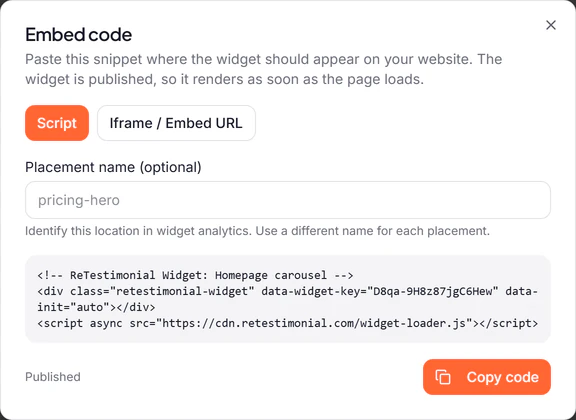
Copy your widget's code
When you sign up, your widget opens with its code ready. Click Publish and copy code. You can copy it again later from Get code in the widget builder.
Add a Custom HTML block
Open the page or post in the WordPress editor. Click the + block inserter where the reviews belong, search for "HTML" and choose Custom HTML.
Paste the code
Click Edit HTML on the block, paste your code, all of it, and click Update.
Preview and publish
Click View, then Preview in new tab. When the reviews look right, publish or update the page.
Good to know on WordPress
On WordPress.com
The code works only on a paid plan with hosting features activated. If it disappears after you save, check both, then paste it again.
In the classic editor
Switch from Visual to Code (called Text in older versions of WordPress) before you paste.
In a footer or sidebar
On a classic theme, go to Appearance > Widgets and add a Custom HTML block to that area. On a block theme, add it to a template in the Site Editor.
Something not showing? Read the full WordPress guide, with what to check when the widget stays empty.
Questions
- Do I need a WordPress plugin?
- No. The widget goes into a Custom HTML block, which every WordPress site has, so there's nothing to install or keep updated.
- Does it work on WordPress.com?
- Yes, on a paid plan with hosting features activated: WordPress.com accepts the widget's code only there. On your own WordPress install, an Administrator or Editor adds it (on a multisite network, a Super Admin), because WordPress removes the code when other roles save.
- Is the Google reviews widget free?
- Yes. The free plan imports up to 25 Google reviews at a time from 1 location, and shows them with a small ReTestimonial badge. Paid plans import more and remove the badge.
- Do I have to connect my Google account?
- No. You search for your business by name and the widget shows its public reviews. There is nothing to authorise and no Google login.
- Will the widget clash with my WordPress design?
- Your site's CSS rules can't reach inside the widget, and its styles never touch your page. You choose its layout, theme and colour in ReTestimonial to suit your site.
- Can I choose which reviews appear?
- Yes. After you sign up, every imported review sits in your inbox. You decide which ones the widget shows and in what order.
- Do new reviews show up on their own?
- On the free plan you bring in new reviews with one click. From Pro, reviews sync automatically every month for up to 3 locations.
Prefer another look? Browse every widget style.
After you sign up: How Google review import and sync work.
Not on WordPress? The same widget works on any website: Google reviews widget.
WordPress is a trademark of its owner. ReTestimonial is not affiliated with or endorsed by WordPress.