Share the work, not your password.
Invite the people who help with your testimonials: a co-founder, a marketer, a freelancer, even your client. Give each of them a role in each project. They join when they accept, and billing stays with you.
Included with Premium (2 teammates) and Business (5). Extra seats are $5 a month.
Sam's inbox
Nicola Harris invited you to Halfmoon Studio on ReTestimonial

ReTestimonial <accounts@mail.retestimonial.com>
The team invitation email. Subject: Nicola Harris invited you to Halfmoon Studio on ReTestimonial.
ReTestimonial Join Halfmoon Studio Nicola Harris invited you to their ReTestimonial workspace. You'll have access to: Driftlane: Member Fernwick Coffee: Member Accept invitation: https://retestimonial.com/invite/sample The invitation expires on October 13. You're getting this because Nicola Harris (nicola@halfmoon.example) invited this address. Not expecting it? You can ignore this email. ReTestimonial: https://retestimonial.com Help center: https://retestimonial.com/help
Three roles. Each one means the same thing in every project.
Here is everything each role allows. It's drawn from the same table the app checks on every action, so this page can't promise more than the product does.
| Action | You, the owner | Admin | Member | Viewer |
|---|---|---|---|---|
| Testimonials | ||||
| See testimonials and analytics | ||||
| Add, edit, approve and reject testimonials | – | |||
| Tag them, mark spam, upload files, use AI on one at a time | – | |||
| Delete testimonials or files, rename or delete tags | – | – | ||
| Run AI over the whole project, translate in bulk | – | – | ||
| Collecting and showing | ||||
| Build and edit forms | – | – | ||
| Import from review sites and files | – | – | ||
| Smart Invites, and the customers in them | – | – | ||
| Build and publish widgets | – | – | ||
| Wall of Love pages and social videos | – | – | ||
| The project | ||||
| Export testimonials to CSV | – | – | ||
| Project settings, the Email Log and webhooks | – | – | ||
| Delete the project | – | – | – | |
| Your workspace | ||||
| Create projects | – | – | – | |
| Invite people, change their roles, remove them | – | – | – | |
| Billing, plan and seats, and moving purchased AI credits | – | – | – | |
No Access hides a project completely: it doesn't appear for them. A role never opens a feature your plan doesn't include.
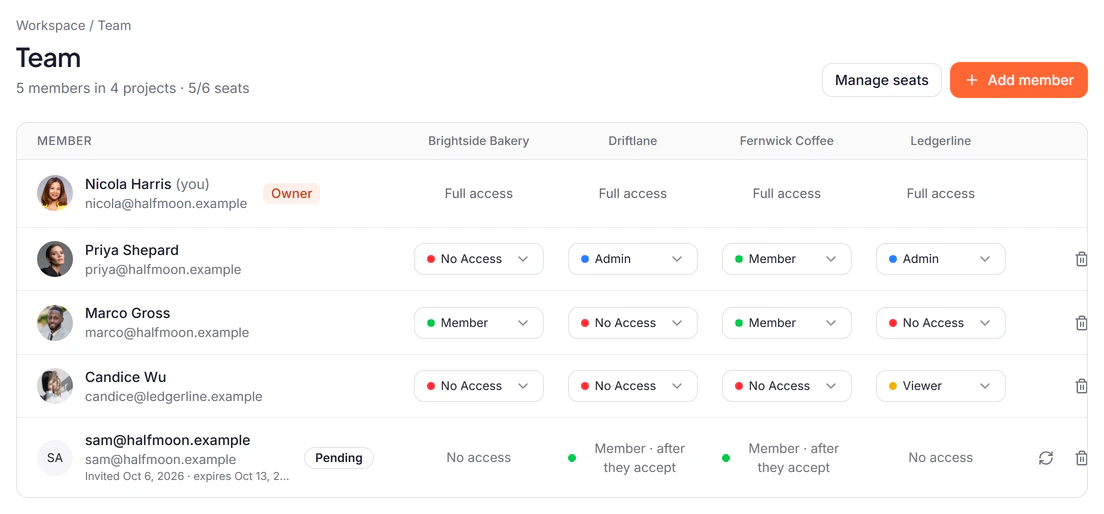
Admin on one project. Viewer on the next.
A role belongs to a project, not to a person. Your designer can run the Wall of Love for one client and only look at another. A client can work in their own project and never see the rest.
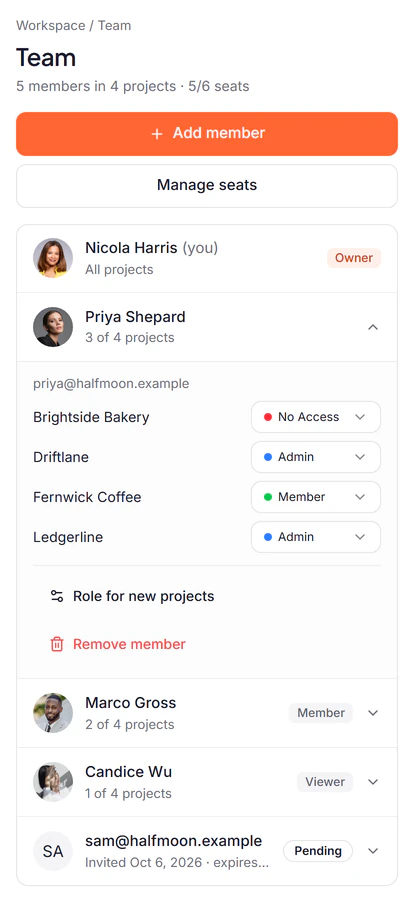
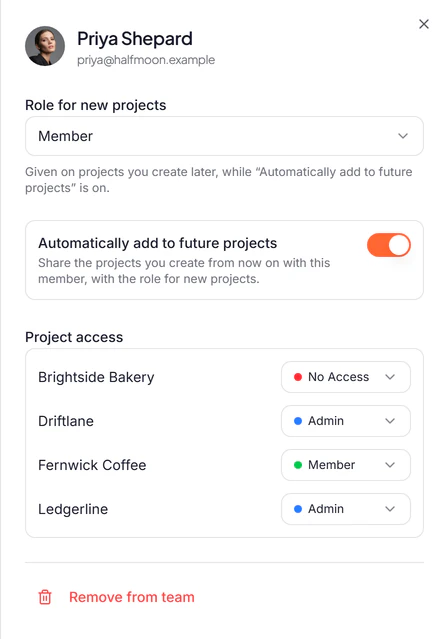
- New projects share themselves
- Give someone a Role for new projects and turn on Automatically add to future projects: each project you start has them in it. If that role is higher than any they hold today, their row says so before it happens.
- Who's on a project, at a glance
- Each project's Team tab lists everyone who can open it, with their role.
Invite by email. They decide whether to join.
No shared login and no surprises: everyone has their own account, and nothing is shared until they say yes.
Pick a role and the projects.
Each project you tick gets that role, and you can change any of them once they've joined. The dialog shows how many seats you have left.
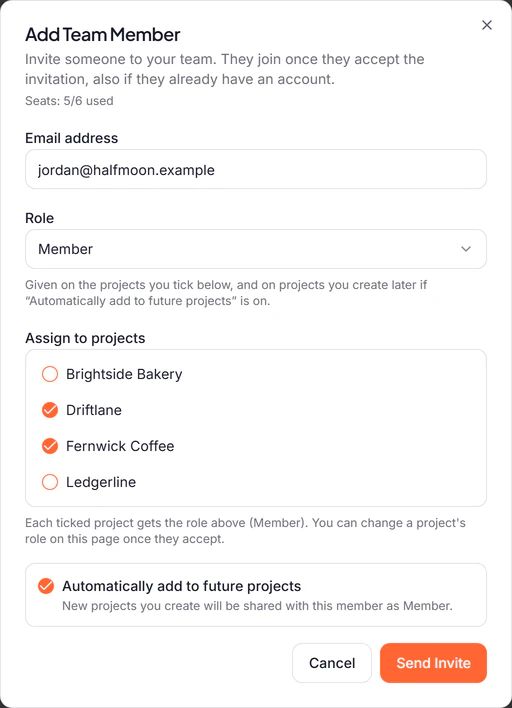
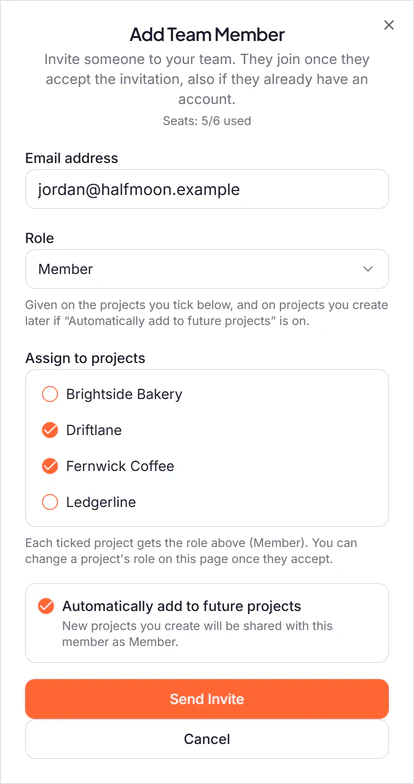
Inviting a new teammate to two of the studio's four clients. They get an email that names every project.
It lists each project they'd have, with the role in it, and when the link stops working: 7 days after you send it. Replies come to you.
Nicola Harris invited you to Halfmoon Studio on ReTestimonial
ReTestimonial <accounts@mail.retestimonial.com>
The team invitation email. Subject: Nicola Harris invited you to Halfmoon Studio on ReTestimonial.
ReTestimonial Join Halfmoon Studio Nicola Harris invited you to their ReTestimonial workspace. You'll have access to: Driftlane: Member Fernwick Coffee: Member Accept invitation: https://retestimonial.com/invite/sample The invitation expires on October 13. You're getting this because Nicola Harris (nicola@halfmoon.example) invited this address. Not expecting it? You can ignore this email. ReTestimonial: https://retestimonial.com Help center: https://retestimonial.com/help
The email Sam got, drawn by the code that sends it. They accept, or decline.
The link opens a page that asks. Accept, and your projects appear on their dashboard. Decline, and the seat is free again. Either way, you're told. A link works only for the address you invited, and a resend makes a new one.
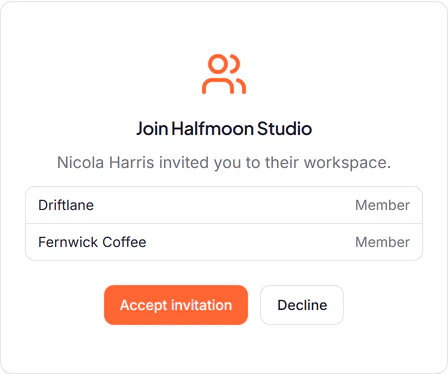
What the link opens: who invited them, and what they'd have.
The risky parts stay with you.
A role decides what someone can change in a project. Some things no role can change, because they belong to the workspace, and the workspace is yours.
- Billing and money
- Only you change the plan, seats or payment method, start a project (each uses a licence) or move purchased AI credits.
- Who's on the team
- Only you invite people, change their roles and remove them. Not even an Admin can add someone.
- Deleting
- Members can't delete a testimonial or a library file. Admins can, and only you can delete a project.
- Work on everything at once
- Running AI over a whole project and translating in bulk are for Admins and you. A Member works one testimonial at a time.
- Taking access back
- Remove someone and every project closes to them, and their seat is free again.
- Leaving is their call too
- Nobody joins without accepting, and anyone can leave a workspace they joined, whenever they like.
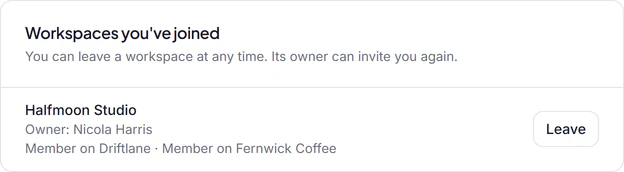
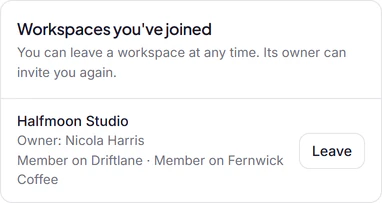
One account for every workspace they're in.
Teammates sign in with their own account, which is free. Your projects show up next to their own, under Shared with you, with their role beside each one.
- Each person hears what they can act on
- New testimonials reach everyone on the project, imports and Smart Invites reach its Admins, and billing reaches only you. Turn on Also email teammates and a project's new-testimonial email reaches them too.
- Shared views of the inbox
- Save a filter as a view for the whole team, so everyone works from the same inbox.
Included with Premium and Business.
Seats are counted across your workspace, you included. An invitation holds its seat until it's answered.
| Feature | Free$0 | Pro$29/mo | Premium$49/mo | Business$79/mo |
|---|---|---|---|---|
| People on the team | Just you | Just you | You + 2 | You + 5 |
| A role in each project | – | – | ||
| Extra seats | – | – | $5/mo each | $5/mo each |
Monthly prices. Paid plans are priced per active project. Extra seats on Premium and Business are $5 a month or $50 a year each, up to 25 seats in all. If your workspace leaves a plan with teammates, nobody is removed: their access pauses and comes back with the plan. Compare every plan
Questions
Does each teammate need a paid account?
No. A teammate signs up for free and joins your workspace; the seat is on your plan. Premium includes 2 teammates and Business includes 5 teammates, and extra seats are $5 a month or $50 a year each.
Can I give someone access to just one project?
Yes. A role is set project by project, and No Access hides a project completely, so a client can work in their own project and never see the others.
What can't an Admin do?
Invite people, change their roles or remove them, open billing, create or delete projects, or move purchased AI credits. Those stay with the workspace owner. In their projects, an Admin can do everything else.
Can a teammate invite other people?
No. Only the workspace owner invites, changes roles and removes people, so the team is always the one you chose.
What happens when I remove someone?
They can't open any of your projects from then on, and their seat is free again. What they added to a project stays in it.
Can I see what each person changed?
Not today: ReTestimonial doesn't keep a history of who changed what. The Spam page does show who marked each testimonial as spam.
Do you support single sign-on (SSO)?
No. Everyone signs in with Google or with an email address and a code or password. If SSO is what your team needs, tell us.
What happens to my team if I downgrade?
Nobody is removed. On a plan without teammates their access pauses, roles and invitations are kept, and it all comes back when the workspace is on Premium and Business again.
How long does an invitation last?
7 days. Until then it holds a seat. Resend it for a new link (the old one stops working), or revoke it to free the seat.
Can teammates see my billing?
No. Billing, invoices and the payment method are the workspace owner's alone. A teammate's own billing page is for their own workspace.
Share the work. Keep the keys.
Start free on your own. Bring your team in on Premium and Business, with a role for each person in each project.